 |
| |||
|
Google this page is not a duplicate Activate a new AVG Key When activating or renewing AVG Internet Security do the following:- AVG 2011 1. Double Click on AVG on your Desktop or 1.Right Click on AVG (bottom right)--> Click Open AVG User Interface 2. Double Click on Licence 3. Click Re-Activate 4. Paste the key over the old one 5. Click Activate 6. Click Back At this point you may see a message that details AVG is restarting Wait until all parts of the product are running then 7. Close AVG To learn about cut and paste see this page CLICK HERE AVG 2012 1. Double Click on AVG on your Desktop or 1. Click on AVG (bottom right)--> This will Open the AVG User Interface 2. Click Help (at the top) 3. Click Re-Activate 4. Paste the key over the old one in the License box 5. Click Activate 6. Click Back At this point you may see a message that details AVG is restarting Wait until all parts of the product are running then 7. Close AVG AVG 2013 1. Double Click on AVG on your Desktop or 1. Right Click on AVG (bottom right) --> Click Open 2. Click on Options (top right) 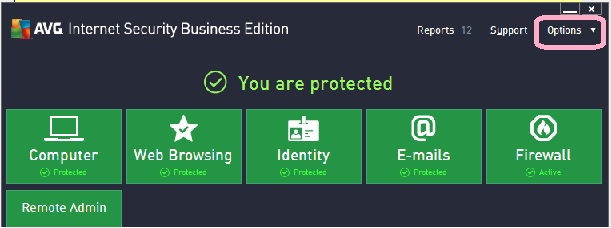
3. Click Re-Activate or Activate 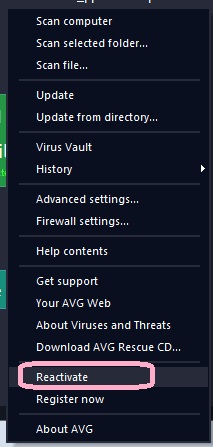
4. Paste the key over the old one in the License box 5. Click Activate 
6. Click Back We can supply and install AVG Internet Security - Contact us 
IP | ||||
|
||||