 |
| |||
|
Google this page is not a duplicate Export Address Book from Outlook In order to create a Comma Separated file which can be read in Notepad, Excel or Imported into Outlook on another computer do the following:- 1. Open Outlook 2. Click "File" --> "Import or Export" 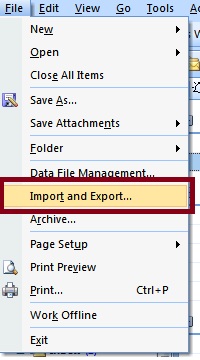
3. Click "Export to a file" --> Click "Next" 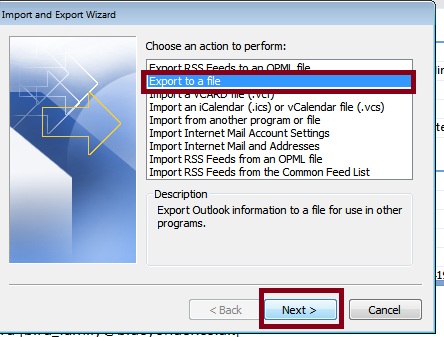
4. Click "Comma Separated Values(DOS)" or similar option --> Click "Next" 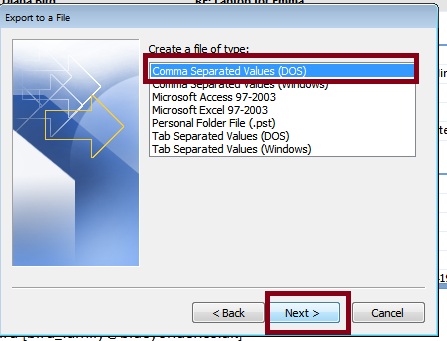
5. Click on "Contacts" folder --> Click "Next" 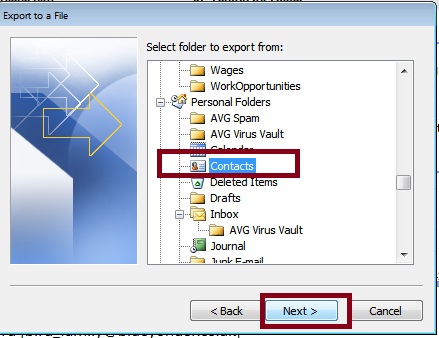
6. Click "Browse" 7. Click the up arrow until it displays Desktop 8. Enter a file name --> Click OK 9. Click "Next" 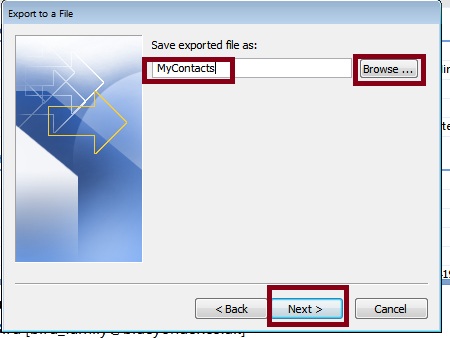
10. If a check box is displayed make sure it is checked --> Click "finish" 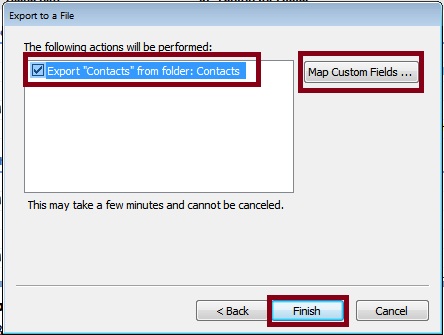
11. Close outlook If you look on your desktop you will see the file created. Double click on it to open in excel, this will only work if you have excel installed on your computer To open it in notepad, right click on the file and select Open With you can then choose which the program to open the file, select Notepad To send the contacts list via email, right click on the file and select "Send To" --> "Mail Recipient" This Opens a new Outlook Message with the File attached, ready to be sent 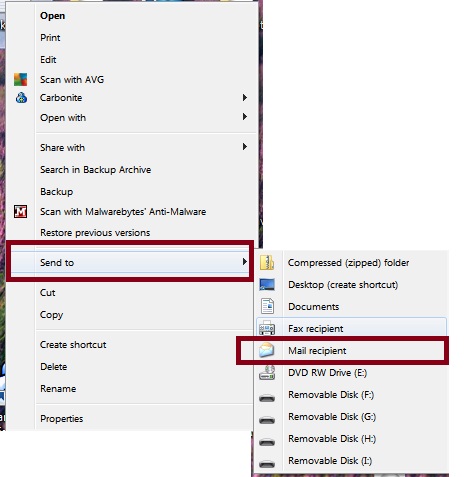
IP | ||||
|
||||