 |
| |||
|
Google this page is not a duplicate Microsoft Releases Fix | Internet Explorer Microsoft has now released a fix to the security flaw in it's Internet Explorer Browser There are two ways to apply this fix :- FIRST METHOD 1. Open Internet Explorer --> Click "Tools" --> "Windows Update" 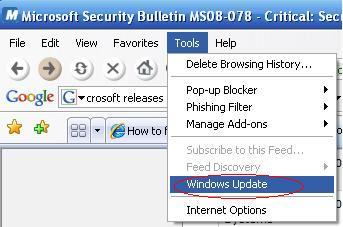
N.B If you cannot see "Tools" in the "Menu bar" press the <alt> key and it should appear Go To ***CONTINUE*** SECOND METHOD 1. Click "Start" --> "Control Panel" (You may need to go to "Settings" first) --> Click "Windows Update" on the left 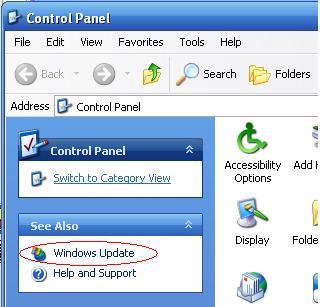
***CONTINUE*** 2. Click "Custom" 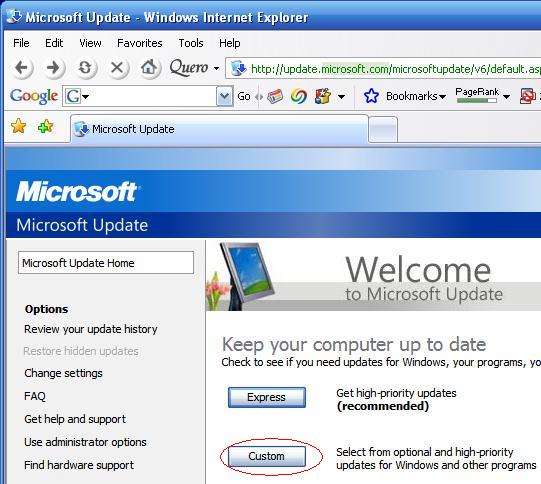
If the list of updates shows "SP3" (Windows Service Pack 3) I would suggest unchecking "SP3" as this takes 20mins to 1 hour to install 3. Click "Review and Install Update" 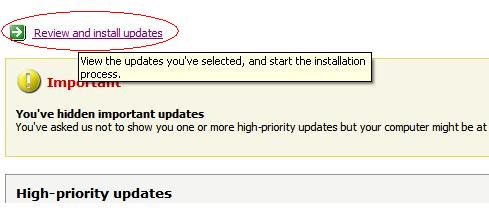
4. Click "Install Updates" 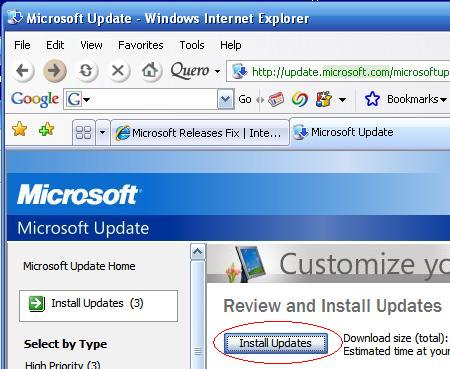
5. After installation Click "Restart Now" 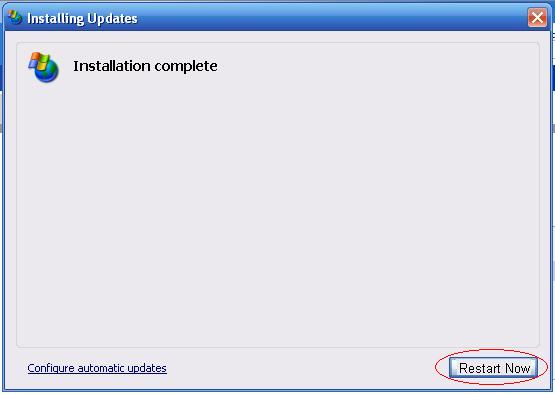
IP | ||||
|
||||